Solids & surfaces
3D solids, surfaces, regions and meshes are tessellated and written as real IFC Brep geometry — the same meshing quality settings as a professional exporter.

Isometra ACAD2IFC is an AutoCAD add-in that exports what is actually in the drawing — solids and surfaces, lines, arcs, circles, polylines and splines, blocks (expanded recursively) and text — to IFC2X3. Not a single-vendor exporter: whatever entity types your drawings have, you choose which ones to send.

Most CAD-to-IFC exporters only understand one modelling tool's own custom entities. ACAD2IFC works on the AutoCAD entity types themselves, so it works on drawings from any discipline.
3D solids, surfaces, regions and meshes are tessellated and written as real IFC Brep geometry — the same meshing quality settings as a professional exporter.
Lines, arcs, circles, ellipses, polylines and splines export as IFC curves — the geometry that solids-only exporters simply drop.
Block references are expanded recursively into their real geometry, exactly like AutoCAD's own EXPLODE — nested blocks included.
Text, mtext and points carry through as IFC annotations, so labels and reference points are not silently lost.
Scans the selection or the whole drawing, lists every entity type found with a count, and lets you check or uncheck exactly which ones to export.
Convert a folder of drawings in the background, without opening each one in AutoCAD — the same window shows progress for every file.
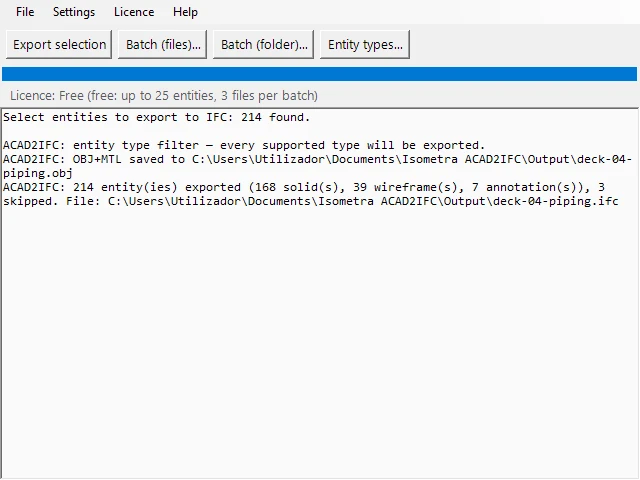
A window inside AutoCAD, not just commands. Menu, progress bar and a log of what was exported and what was skipped — every command also works from the AutoCAD command line, for scripting.
Read the FAQSelect entities, or export a whole drawing — or a whole folder of drawings — in one pass.
ACAD2IFC lists every entity type it found, with a count, and you check which ones actually get exported.
A signed, valid IFC2X3 file (plus a zipped copy and an OBJ preview), with the entities you chose.
ACAD2IFC runs inside your own AutoCAD, on your PC. Nothing is uploaded.
AutoCAD 2026, 64-bit, on Windows. It installs as an add-in and loads automatically the next time AutoCAD starts — no manual NETLOAD.
It reads whatever is already open in AutoCAD — DWG, DXF, any drawing your AutoCAD can open — since it works on the in-memory entities, not a file format of its own.
They are listed in the type picker as not supported in this version (currently hatches and dimensions) and skipped, counted separately from what was exported, so nothing silently vanishes without you knowing.
The free edition always works — no account, no time limit — with a cap of 25 entities per export and 3 files per batch. A licence removes the cap.
Nowhere. ACAD2IFC runs inside your own AutoCAD and writes files to your own Documents folder. Nothing is uploaded.
Ask for a 14-day trial licence with no limit, or email us and tell us what you need to export.